
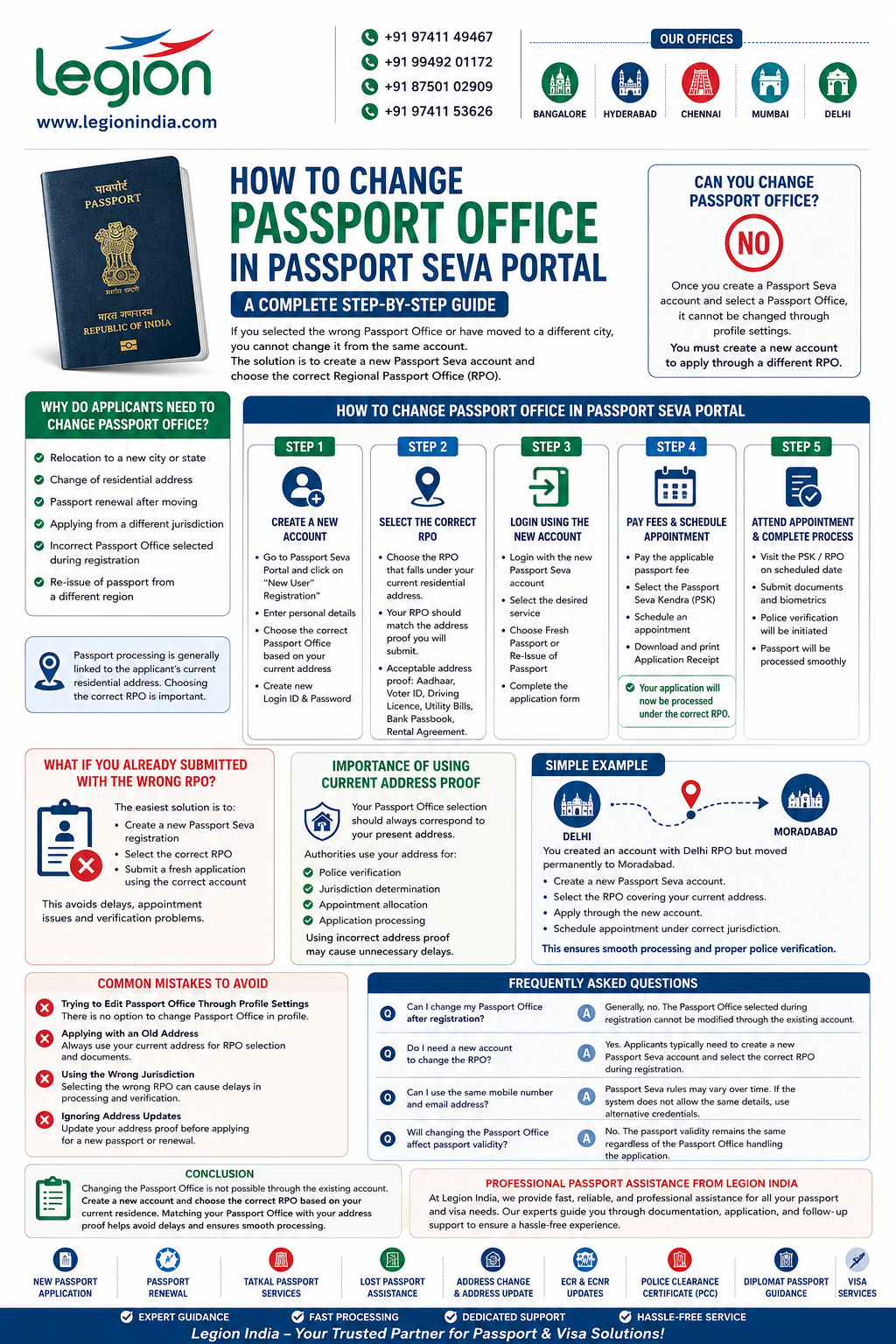
If you have selected the wrong Passport Office while registering on the Passport Seva Portal or have moved to a different city, you may wonder how to change the passport office in Passport Seva. This is a common issue faced by applicants applying for a new passport, passport renewal, or passport re-issue.
The important thing to understand is that the Passport Office (Regional Passport Office or RPO) selected during Passport Seva registration cannot usually be changed from the same user account. According to Passport Seva guidelines, the Passport Office chosen during registration is fixed and cannot be modified through the “Modify Profile” option.
This guide explains how to change your passport office correctly and avoid application delays.
Can You Change Passport Office in Passport Seva?
In most cases, No. Once you create a Passport Seva account and select a Passport Office during registration, the portal does not provide an option to change it later through profile settings.
The Passport Seva Portal clearly states that the selected Passport Office cannot be modified after registration. If you need to apply through a different Regional Passport Office (RPO), you must create a new user account.
Why Do Applicants Need to Change Passport Office?
There are several situations where changing the passport office becomes necessary:
- Relocation to a new city or state
- Change of residential address
- Passport renewal after moving
- Applying from a different jurisdiction
- Incorrect Passport Office selected during registration
- Re-issue of passport from a different region
Since passport processing is generally linked to the applicant’s current residential address, choosing the correct Regional Passport Office is important.
How to Change Passport Office in Passport Seva Portal
Follow these simple steps if you need to change your Passport Office:
Step 1: Create a New Passport Seva Account
Since the existing Passport Office cannot be edited, the first step is to register again on the Passport Seva Portal.
During registration:
- Select “New User Registration”
- Enter your personal details
- Choose the correct Passport Office based on your current residential address
- Create a new Login ID and Password
Step 2: Select the Correct Regional Passport Office (RPO)
When registering the new account, carefully choose the Passport Office that falls under your current place of residence.
Your selected RPO should match the address proof you intend to submit with your application.
Examples of acceptable address proof include:
- Aadhaar Card
- Voter ID
- Driving Licence
- Utility Bills
- Bank Passbook
- Rental Agreement
Step 3: Login Using the New Account
After successful registration:
- Login with the newly created Passport Seva account
- Select the desired service
- Choose Fresh Passport or Re-Issue of Passport
- Complete the application form
Step 4: Pay Fees and Schedule Appointment
After completing the application:
- Pay the applicable passport fee
- Select the Passport Seva Kendra (PSK)
- Schedule an appointment
- Download and print the Application Receipt
Your application will now be processed under the correct Regional Passport Office.
What If You Already Submitted an Application with the Wrong RPO?
If you have already submitted an application using the wrong Passport Office, the easiest and most practical solution is often to:
- Create a new Passport Seva registration
- Select the correct RPO
- Submit a fresh application using the correct account
This ensures that your application is processed under the jurisdiction that matches your current residential address.
In many cases, using the wrong Regional Passport Office can lead to delays, appointment issues, or verification complications.
Importance of Using Current Address Proof
Your Passport Office selection should always correspond to your present residential address.
The passport authorities use your address for:
- Police verification
- Jurisdiction determination
- Appointment allocation
- Application processing
Submitting address proof from a different region while selecting another Passport Office may create unnecessary complications during verification.
Simple Example of Changing Passport Office
Suppose you originally created a Passport Seva account using the Delhi Regional Passport Office because you were residing in Delhi.
Later, you moved permanently to Moradabad and now have valid address proof showing your Moradabad residence.
In this situation:
- You should create a new Passport Seva account.
- Select the Regional Passport Office that covers your current address.
- Apply for passport services through the newly registered account.
- Schedule your appointment under the correct jurisdiction.
This ensures smooth processing and proper police verification.
Common Mistakes to Avoid
Trying to Edit Passport Office Through Profile Settings
Many applicants search for a “Change Passport Office” option inside the profile section. This option is generally not available.
Applying with an Old Address
Always use your current address when selecting an RPO and submitting supporting documents.
Using the Wrong Jurisdiction
Selecting an RPO that does not correspond to your residence can cause delays during processing and verification.
Ignoring Address Updates
If you have recently relocated, update your address documentation before applying for a new passport or renewal.
Frequently Asked Questions
Can I change my Passport Office after registration?
Generally, no. The Passport Office selected during registration cannot be modified through the existing account.
Do I need a new account to change the RPO?
Yes. Applicants typically need to create a new Passport Seva account and select the correct Regional Passport Office during registration.
Can I use the same mobile number and email address?
Passport Seva rules may vary over time. If the system does not allow the same details, use alternative credentials during registration.
Will changing the Passport Office affect passport validity?
No. The passport validity remains the same regardless of the Passport Office handling the application.
Conclusion
Changing the Passport Office in Passport Seva is not usually possible through the existing account. If you need to apply through a different Regional Passport Office due to relocation, address change, or incorrect selection during registration, the recommended solution is to create a new Passport Seva account and choose the correct RPO based on your current residence. Ensuring that your Passport Office matches your address proof helps avoid delays and makes the passport application process smoother and more efficient.
Professional Passport Assistance from Legion India
At Legion India, we provide fast, reliable, and professional assistance for new passport applications, passport renewals, Tatkal passport services, lost passport cases, address changes, ECR and ECNR updates, Police Clearance Certificates (PCC), diplomat passport guidance, and visa services. Our experienced professionals offer dedicated support throughout the documentation and application process, helping applicants avoid errors and complete passport formalities quickly and efficiently. Whether you need urgent passport assistance or expert visa support, Legion India is committed to delivering hassle-free and dependable services tailored to your needs.

Leave a Reply